Showing posts with label Frustration. Show all posts

Monday, September 22, 2008

I said, LATER.


I have recently setup a dual-boot environment in my box (Vista U64 / XP Pro). While I'm working in newly setup XP environment, I met this familiar friend.

XP Automatic Updates Reboot

Actually I was in the middle of some documentary job, and when this pop-ups, the focus switched from MSWord to this friendly dialogue. Well, much better than the previous one, which will steal your focus and if you are unawared of the focus-changes, hitting ENTER results in a "Restart Now"

Updating your computer is almost complete. You must restart your computer for the updates to take effect. Do you want to restart your computer now?

But I can't leave the dialogue unhandled. It starts counting me, something like "Windows will restart your computer automatically in 4:52 minutes".

OK... my dear windows. Please "Restart Later".

Dialog dismissed, I continue working, although my work flow was interrupted by it.

Few minutes gone. The dialog appears again, asking the same question, and giving me 5 minutes to response until it will restart automatically.

"Restart Later"... When i said later, i meant later.

Few minutes gone. The dialog appears again, asking the same question, and giving me 5 minutes to response until it will restart automatically.

"Restart Later"!!!!!! Hey can't you listen to me!!

Few minutes gone. The dialog appears again, asking the same question, and giving me 5 minutes to response until it will restart automatically.

"Restart Later"!!!!!!! What the hell!!

Few minutes gone. The dialog appears again, asking the same question, and giving me 5 minutes to response until it will restart automatically.

"Restart Now". Yes, I surrender...

Tuesday, September 9, 2008

Continuous Continues

I was organising my digital assets today using Adobe Lightroom 2.

For some reasons I would like to re-import the library. I would like to rename the folder from yyyymmdd to yyyy-mm-dd for consistency.

I highlighted all folders in questions by shift+click. OK, no problem.

Right Click and choose the Remove Option. (so that I can reimport them again)

I was asked IF I am really wanting to remove the folder. Continue, or Cancel?

image

Nice alert. In case someone choose the Remove Option accidentally. At least he got the final chances before confirmation.

Ok, I'm sure I want to continue. So I clicked Continue.

Um.. few seconds gone.. huh!?

It asks for another confirmation again? Turn out that Lightroom is kind enough to ask for my confirmation for EVERY folders I choose to remove!

Well I've got 200+ folders to remove.

if you know a bit programming geek, try reading this.

TOTAL_FOLDER_SELECTED = 200+;

for (i = 0; i < TOTAL_FOLDER_SELECTED; i++){

if (MessageBox.Show("Remove the folder xxyyzzzz") == Continue){
    REMOVE_FOLDER(FOLDER[i]); //3-5 seconds operation
}

}

Well, what a shame.

Friday, August 1, 2008

Can you respect my preference by following my pre-defined preference?

As usual, I started visiting some of my favourite blogs after a long day work. It is one of the most relaxing moments and I do learn a lot from those respectable blog writers.

I started Google Reader, and as usual my favourite subscription listed out. Um... wait! It's not that "usual" as all!

The UI language has became Chinese!

1

2

Even the title bar is in Chinese, no luck either

title

What happened! I swear they were in English in the countless nights before!

(Some background to my UI preference: I'm living in Hong Kong where Chinese is the dominant language. I do speak Chinese natively, but for some reason I really don't want to see Chinese UI in my computer. It is not because I dislike Chinese language (actually I'm proud of it), but the fact that... well, the Chinese Translation used in the UI of most software are simply ... misleading and confusing. It's like translating English to French in some online-translation web site, and put on production without an editor proofreads on it... I've got many complaints to Chinese UI, and it definitely worth a separate and dedicated category on it )

I start to investigate WHY is that.

  • My Operating System is Windows Vista 64 , English
  • My browser is Mozilla Firefox 3.0.1, English (Also tested with IE 7, no luck either)
  • Browser Language Option: English

 firefox-lang

  • Most importantly, I used to have an English UI and I have no setting changes made in my computer recently.

So there must be some problem with Google Reader, and yes, I found this kinda ridiculous setting moments later.

 setting

語言 : 土耳其文 (Language : Turkish)

For some reasons Google changed my UI language to Turkish! But for some another reason, it displays the UI to me in Chinese!?

Are you kidding me, Google?

Wednesday, July 30, 2008

What is that button about?

OK Windows Vista users. You certainly have enough familiarity to the vista-style start menu, ain't you?
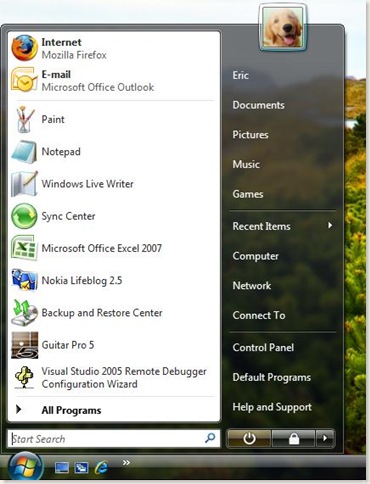
startmenu

So what if I ask you an easy enough question, what's the function of the button located right next to the search box?

What happens when I click on it?   

Do really think about it before you continue reading the rest.

Is it used for turning off your computer? or is it used to putting your computer in stand-by mode?

Let's ask for the tooltip by pointing the cursor over the button.

standby

Seems it is the "stand by" button, which, although virtually turning off your computer, there's actually power (electricity) running through it for quick resuming.

But Wait! I came across this occasionally!

updates

It does read "shuts down", which means it's going to completely turning off your computer!

What causes the different behaviour?

You may already notice, the icons from the above 2 pictures are slightly different. When windows found some updates for your computer, it will (by default) automatically download it and asks you to install them. Isn't it nice?

The problem is however, putting two different behaviour into the same position. If I am a novice computer user, I will be confused and get mad easily by the behaviour. "Hey, last night when I click on the button with a small circle next to the search box, my computer turns off completely. But today when i click on the same button (the button on the same position, to be accurate), my computer does not turn off, the power LED keeps blinking!"

The UI designer may blame the users for not looking at the tooltip, and ignoring the different graphics on the button. He maybe right. He has told you what will happen when you click on it but you choose to ignore it. You choose to perform tasks the way you used to. So if something goes wrong, the UI designer is not the one to be blamed.

But is it a good design?

Surely not.

First of all, usability principle #1. Users don't read 

While saying a 19-words sentences "Saves your session and puts...... quickly resume working.", why not just label the icon as a merely 2-words, "Stand By" ?

Secondly, I doubt if the UI designer knows anything about "Conceptual Models". We have our own way to interpret "how things in our surrounding environment work". As an example to illustrate, suppose you take the Bus Route #5 everyday to work. You know really well that when you see a no. "5" on the bus, you know where it's going without looking at its destination.

What if one day the destination of Route #5 changed?  To make things more complicated, What if the destination of Route #5 is reverted back to its original few days later?

Maybe it's going to be some degree of disaster.

People keeps saying how Windows Vista outweighed Windows XP. Surely XP is almost 10 years old and Windows Vista, as the successor of WinXP, offers us a beautiful and fancy operating system. However in many aspect, I still think WinXP is much more better than Vista, in terms of UI designs and usability. Take the "Shutdown vs Standby" cases as an example, I think the WinXP counterpart is much more easier to follow and causes much less confusion.
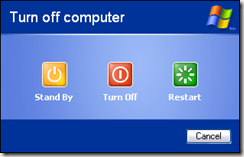
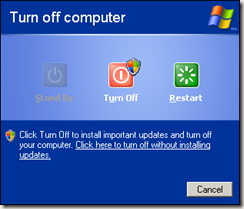
Windows_XP_Shutdown


shutdown_with_updates5